Why Restaurants Need a Dedicated Digital Menu, Not Just a PDF
Walk into any restaurant that claims to have a "digital menu" and there's a good chance what they actually have is a PDF. A scanned image of their printed menu, uploaded to their website or linked from a QR code. It opens on the diner's phone, and they pinch, zoom, scroll sideways, and squint at blurry text rendered for an A3 page on a 6-inch screen.
The restaurant owner thinks they've gone digital. The diner thinks otherwise.
The gap between a PDF menu and a dedicated digital menu platform is enormous — and it affects everything from Google search visibility to allergen safety to revenue per table. If your restaurant currently uses a PDF as its "digital menu," here's what you're missing and why it matters.
What's Wrong with a PDF Menu?
A PDF is a document format designed for printing. It preserves exact layout, fonts, and positioning so that a page looks the same on every device and every printer. That's its purpose, and it does that job well.
But a restaurant menu viewed on a phone is not a print job. It's an interactive experience where a diner needs to find information quickly, make decisions, and potentially filter by dietary requirements. A PDF does none of this.
The Mobile Experience Problem
Restaurant QR code scans happen overwhelmingly on smartphones. When a diner scans a QR code at the table and a PDF loads, several things happen:
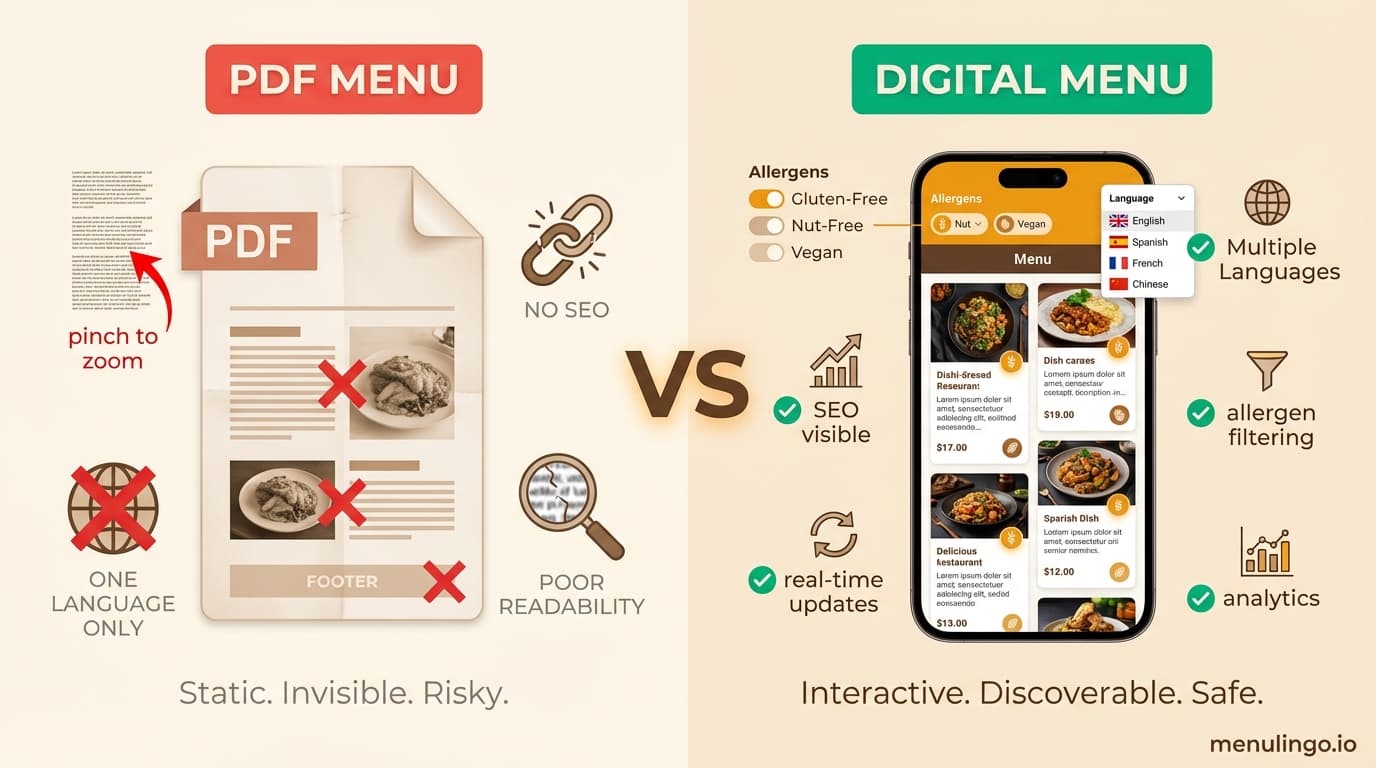
The text is too small to read at default zoom. The diner pinches to zoom in. Now they can read one section, but they've lost the context of the full page. They scroll sideways to find prices. They scroll back to find descriptions. They lose their place.
On slower connections or older phones, the PDF takes several seconds to download before anything appears. A dedicated digital menu renders progressively — headings first, then items — so the diner starts reading immediately.
The overall experience is frustrating enough that many diners abandon the PDF and ask the waiter for a printed menu instead. At that point, the QR code hasn't saved time or improved the experience. It's added a step.
No Search Engine Visibility
This is where PDFs cost restaurants real money.
Google can technically index PDF content, but it treats PDF text as a single blob. There are no structured headings, no semantic HTML, no schema markup, and no internal linking. A PDF menu uploaded to your website is effectively invisible to the searches that drive foot traffic.
A dedicated digital menu platform like MenuLingo creates a proper web page for your restaurant's menu — complete with semantic HTML, structured data (Restaurant and Menu schema markup), and individual dish listings that Google can crawl and understand. Your MenuLingo menu page becomes a publicly indexable URL that you link from your Google Business Profile as your official menu link.
This matters because when a potential diner searches for "La Trattoria menu" or "Italian restaurant menu [suburb name]," Google has two options: a PDF blob it can barely parse, or a properly structured web page with schema markup, dish names, descriptions, allergen data, and multilingual content. The structured page wins.
Here's how it works in practice:
- Google Business Profile: You add your MenuLingo URL as your menu link in GBP. When someone taps "Menu" on your Google Maps listing, they get a proper digital menu — not a PDF download. Google also crawls this link and uses the structured data to surface your dishes in local search results.
- "[Your restaurant] menu" searches: Your MenuLingo page with proper schema markup can rank for these high-intent queries — the exact searches that diners make when they're deciding where to eat.
- Multilingual discovery: Your menu is available in 100+ languages, each as a crawlable URL. A Chinese tourist searching in Mandarin for restaurant menus in your area can actually find yours.
- Rich results: Restaurant and Menu schema markup can generate rich snippets in Google — showing your dishes, price ranges, and allergen information directly in search results.
A PDF gives Google nothing to work with. A dedicated digital menu gives Google exactly the structured content it needs to send hungry diners to your door.
The Allergen Compliance Gap
This is perhaps the most consequential difference between a PDF and a dedicated digital menu — and the one most likely to create legal and safety problems.
PDFs Can't Filter Allergens
A diner with a nut allergy opening a PDF menu has to read every single item description and manually check for nut-containing ingredients. They're relying on their own reading comprehension, in potentially unfamiliar culinary language, on a tiny screen, in a dim restaurant.
A dedicated digital menu with allergen safety features lets the diner tap "tree nuts" and immediately see only dishes that are safe. Dishes containing nuts are hidden or clearly flagged. The diner doesn't need to manually parse every description — the menu does it for them.
This isn't just a convenience feature. For diners with severe allergies, it's a safety feature. And for restaurants, it's a compliance feature. Providing allergen information in a format that diners can actually use — not just a format that technically contains the information — is increasingly the standard that food safety regulators expect.
PDFs Don't Update When Recipes Change
When your chef changes the sauce on a dish from a nut-free version to one containing almonds, the allergen information needs updating immediately. On a PDF, this means creating a new PDF, uploading it, replacing the old link, and hoping the diner's browser doesn't serve a cached version of the old file.
On a dedicated digital menu, the change is instant. Update the dish, the allergen information updates, and every diner scanning the QR code from that moment forward sees the correct information. There's no lag, no cached old versions, no risk of outdated allergen data.
The real cost of allergen mistakes makes this distinction consequential. Allergen information that's wrong because it's stale is worse than no allergen information at all.
Translation: Where PDFs Fail Completely
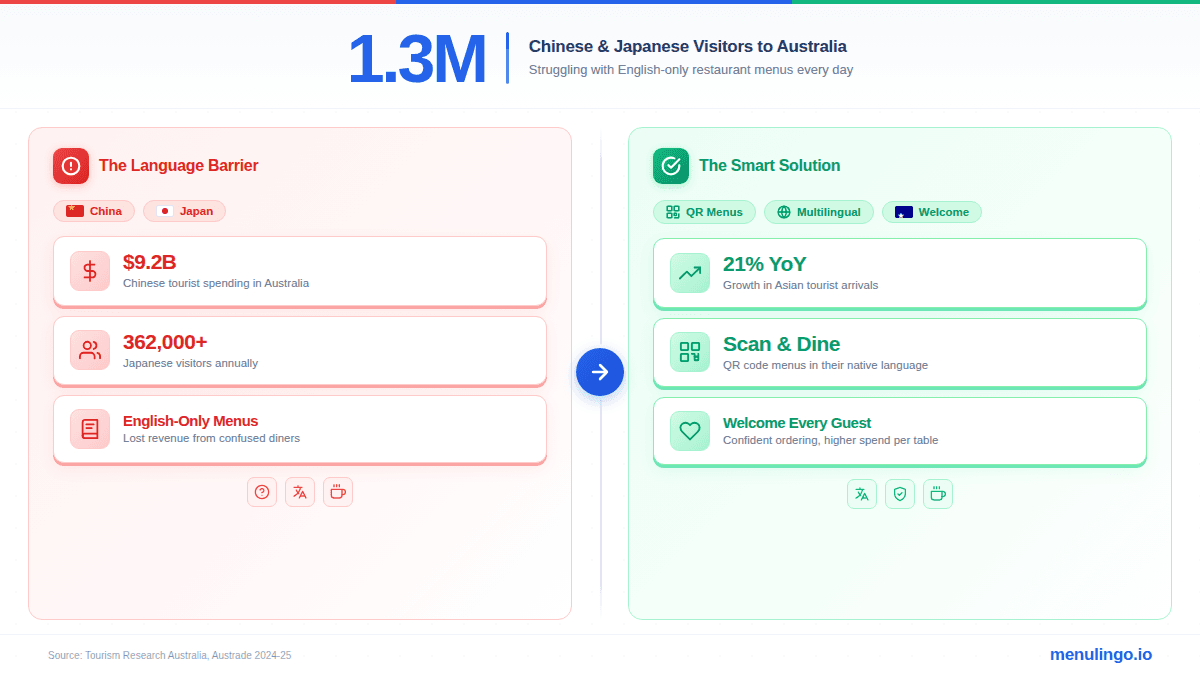
Restaurants in tourist areas face a fundamental problem: their international diners can't read their menu. A PDF menu in English serves English-speaking diners. Everyone else is excluded.
Creating separate PDF menus for each language is theoretically possible but practically unworkable. A restaurant that wants to serve Chinese, Japanese, Korean, Spanish, French, and Arabic speakers needs seven separate PDFs. Each one needs updating whenever the menu changes. Each one needs accurate translation of culinary terms — which, as our analysis of why Google Translate fails for restaurant menus explains, is not something generic translation tools handle well.
A dedicated multilingual menu platform solves this from a single menu source. The restaurant manages one menu. The platform provides professional translations in every supported language. The diner selects their language and reads the full menu — including allergen information — in their native tongue.
The revenue impact of language barriers in restaurants is significant: international diners who can't read the menu order conservatively, skip upsells, and rarely return. A multilingual digital menu eliminates this entirely.
Accessibility: PDFs Create Barriers
Web accessibility isn't optional — it's a legal requirement in many jurisdictions under disability discrimination laws (ADA in the US, Equality Act in the UK, DDA in Australia). And PDF menus are among the most common accessibility failures on restaurant websites.
Screen Reader Compatibility
Most PDF menus are created from scanned images, design files, or untagged exports. Screen readers — used by visually impaired diners — can't read the text in these PDFs. The diner hears nothing, or hears a jumbled sequence of characters that doesn't correspond to the actual menu content.
A properly built web-based digital menu uses semantic HTML that screen readers navigate naturally. Headings, lists, descriptions, and prices are all properly labelled and read in the correct order.
Responsive Design
PDF menus have a fixed layout designed for a specific page size. They don't reflow for different screen sizes. On a large tablet, they're readable. On a phone, they're not. On a phone held in landscape mode, they're partially readable but awkward.
A responsive digital menu adjusts its layout to the screen. Dish cards stack vertically on phones, expand into grids on tablets, and present full-width on desktops. The reading experience is optimised for whatever device the diner is using.
Keyboard Navigation
Diners who navigate by keyboard (due to motor impairments or assistive technology) can't interact with a PDF menu in a meaningful way. A web-based digital menu supports tab navigation, focus indicators, and keyboard-accessible allergen filtering.
Analytics: PDFs Are a Black Box
When a diner opens your PDF menu, you know one thing: someone downloaded a file. You don't know which dishes they looked at, how long they spent on each section, whether they selected allergens, which language they preferred, or where in the menu they dropped off.
A digital menu platform provides analytics on all of these. Menu analytics can tell you which dishes get the most views, which allergen filters are most commonly used, which languages your diners request, and how long diners spend browsing before ordering.
This data is commercially valuable. If your analytics show that 40% of diners filter for gluten, you know there's demand for more gluten-free options. If 25% of your scans are in Mandarin, you know your Chinese marketing is working. If a dish gets many views but few orders, the description or price might need adjusting.
With a PDF, you're guessing. With a digital menu, you're making data-informed decisions.
Cost: The False Economy of PDFs
The appeal of PDF menus is their apparent low cost. Take a photo of the printed menu, save as PDF, upload to the website, print a QR code. Total cost: free.
But this calculation ignores the hidden costs:
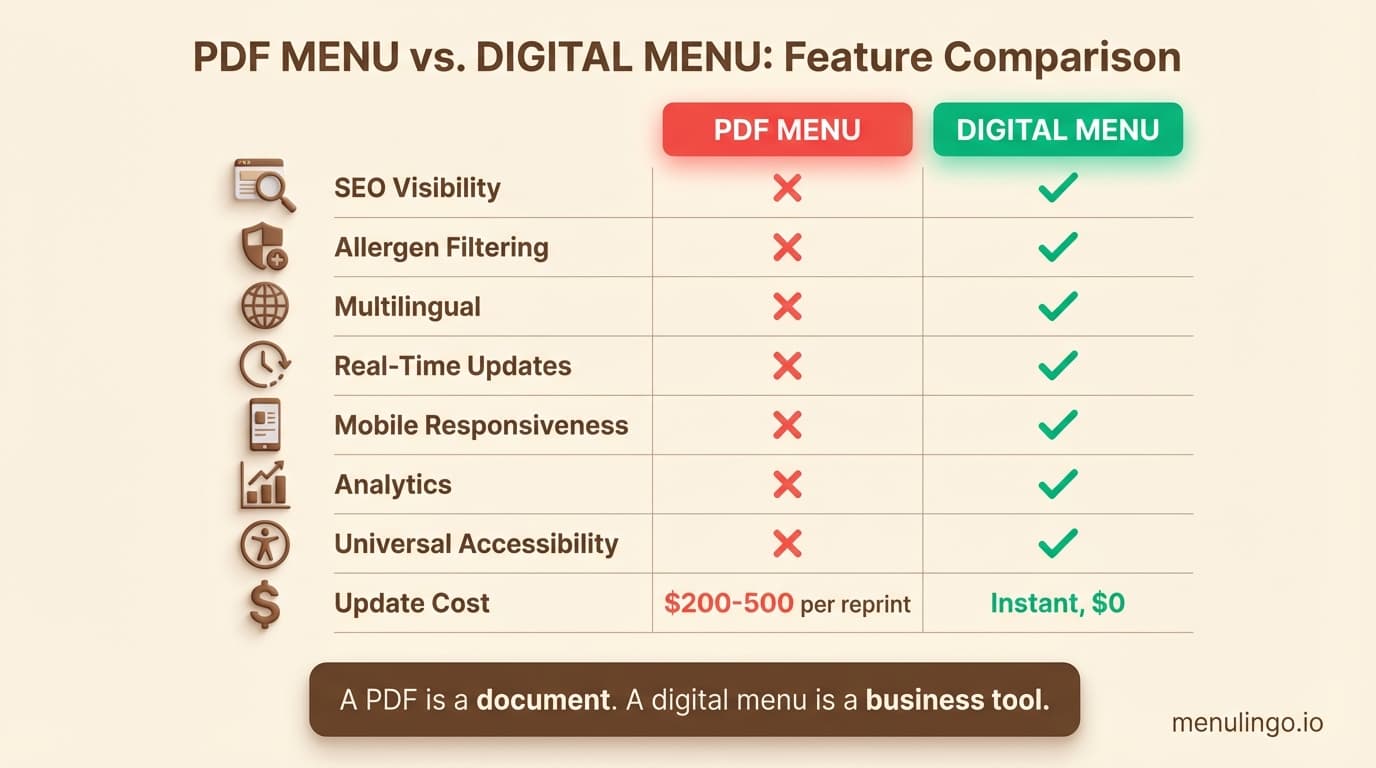
Reprinting and re-uploading. Every menu change means a new PDF. If you update your menu monthly, that's 12 cycles per year of PDF creation, QR code verification, and website updates. If your QR code links to a specific PDF URL that changes, every printed QR code in the restaurant needs replacing.
Lost search traffic. A properly structured digital menu page — linked from your Google Business Profile and indexed with schema markup — generates ongoing organic visibility for "[your restaurant] menu" searches. A PDF generates none. Over 12 months, the difference in Google-driven foot traffic easily exceeds the cost of a digital menu platform.
Allergen compliance risk. One allergen incident resulting from outdated PDF information can cost tens of thousands in legal fees, compensation, and reputational damage. The cost of preventing this through a digital platform that updates instantly is minimal by comparison.
Lost revenue from international diners. A PDF in one language serves one audience. A multilingual digital menu serves everyone who walks in the door. The revenue recovered from international diners who can finally read your menu typically exceeds the platform cost many times over.
Staff time. Every minute a waiter spends explaining the menu to a diner who can't read the PDF is a minute not spent on table service. Staff efficiency improves when the menu communicates effectively without human intervention.
When you account for all costs — direct and indirect — a PDF menu is significantly more expensive than a dedicated digital menu platform for any restaurant that changes its menu regularly, serves international diners, or needs allergen compliance.
What Does a Dedicated Digital Menu Actually Look Like?
A purpose-built restaurant digital menu platform provides:
A web-based menu page with a unique URL for your restaurant. Diners access it via QR code, a link on your website, or the "Menu" button on your Google Business Profile listing. No app download required. The page is publicly indexable with Restaurant and Menu schema markup, so Google understands your dishes and can surface them in local search results.
Structured dish listings with names, descriptions, prices, and images — all searchable, all accessible, all rendered beautifully on any device.
Allergen information per dish with diner-side filtering. AI-powered allergen detection flags potential allergens in your dishes, and you confirm before they go live. Diners filter by their allergens and see only safe options.
Multilingual display in the diner's selected language. One menu, translated into dozens of languages, accessible from a single QR code.
Real-time updates. Change a price, add a dish, remove a seasonal item — the menu updates immediately for every diner.
Analytics showing scan volume, language preferences, allergen filter usage, and dish popularity.
Custom branding with your restaurant's colours, logo, and visual style. The menu looks like yours, not like a generic platform.
Making the Switch
If your restaurant currently uses a PDF menu, switching to a dedicated digital platform is straightforward:
Step 1: Upload your current menu — even a photo of your printed menu works. AI parsing extracts your dishes, descriptions, and prices automatically.
Step 2: Review and confirm allergen information flagged by AI detection.
Step 3: Choose your languages and template style.
Step 4: Generate a QR code and place it at your tables. The QR code is permanent — it always links to your current menu, even as you make changes. Learn the details in our QR code setup guide.
Step 5: Update your Google Maps listing and website to link to your digital menu page instead of the PDF.
The entire process takes less than an hour for a typical restaurant menu. For a walkthrough of the full setup, see our guide on how to create a digital menu for your restaurant.
Time to Move Beyond the PDF
A PDF was a reasonable first step when QR code menus became widespread during the pandemic. But diners' expectations have moved on. They expect menus that work on their phone, speak their language, and keep them safe from allergens. A PDF does none of these things.
A dedicated digital menu platform handles all of them — and costs less than the hidden expenses of maintaining a PDF-based approach.
MenuLingo provides dedicated digital menus with AI allergen detection, multilingual translation, and real-time updates — starting at $19.99/month on the Starter plan. View pricing or start your free trial.
Ready to make your menu multilingual?
Join restaurants already serving diners in 9 languages with accurate allergen information. 14-day free trial, no credit card required.
Start Your Free Trial